

Oncor’s retirement and savings benefits go beyond the basics. Along with pension and 401(k) options, you’ll find dedicated financial planning services, investment advisors, retirement seminars, and digital tools designed to help you prepare for a secure tomorrow.
The Oncor Retirement Plan provides additional retirement income funded entirely by Oncor through one of two benefit formulas.
Cash Balance Retirement Plan Formula
Eligibility
How it Works
Oncor makes monthly contribution credits to your retirement account based on your age and accredited years of service (percentages shown in table below). The company also makes interest credits to your account.
You are fully vested after three years of vesting service or when you reach age 65, whichever comes first. Note: There is no partial vesting in your retirement benefit.
|
Contribution credits are based on your age + years of accredited service. If the sum is: |
The annual percentage of eligible earnings credited to your account is: |
|---|---|
|
Less than 35 |
3.5% |
|
35 – 49 |
4.5% |
|
50 – 64 |
5.5% |
|
65 or over |
6.5% |
Traditional Retirement Plan Formula
Eligibility
You’re covered under this formula only if you meet ALL of the following:
Start saving from day one. You’re eligible to participate in the Oncor Thrift Plan from your date of hire.
Making Contributions
Oncor’s Match
Automatic Enrollment
If you don’t make an enrollment choice when hired, you’ll be automatically enrolled in the plan with the following default settings:
To avoid automatic enrollment, you must actively opt out when hired.
Learn more about the 401(k) Thrift Plan, annual limits, investment options, and more at NetBenefits.com. You can also find details in Resources.

Don’t let student debt hold you back. Oncor treats your monthly student loan payments as retirement contributions and matches them by contributing to your 401(k) account after the plan year ends.
Eligibility: Your federal or private student loans must be in your name, provided by a U.S.-based loan service, and used for undergraduate or graduate education (for yourself or someone else).
This benefit helps you reach your full employer match potential if you’re not contributing enough to receive it. If you’re already receiving the full match through regular contributions, you won’t be eligible for additional matching.
Enroll and learn more at NetBenefits.com.
Whether you’re just starting to think about retirement or have already picked your date, we’ve created comprehensive tools and checklists to help you make important decisions and prepare for this important transition. It’s never too early to start planning for your next great life adventure!
Here are a few things to consider when you’re ready to initiate your retirement.
Work directly with Fidelity to:
Call Fidelity at 1-866-602-0629 for assistance.
Pension Elections
Complete your pension elections online at NetBenefits.com up to 180 days before your retirement date. Your elections determine your monthly payment amount and survivor benefits.
Setting Your Retirement Date
Choose the 1st day of the month following your last day of work as your retirement date. This timing is especially important if you’re age 65+ and Medicare-eligible, as it may impact benefit eligibility and pension calculations.
Notifying Your Manager
Give your manager/supervisor 30 to 90 days’ notice to ensure a smooth transition.
Understanding Key Dates

Find help navigating the retirement process with this digital tool designed to assist with important retirement decisions. Includes step-by-step instructions for applying for pension benefits, enrolling in Medicare, and transitioning your health coverage with savable checklists.
You may have several options for your 401(k) Thrift Plan account balance.
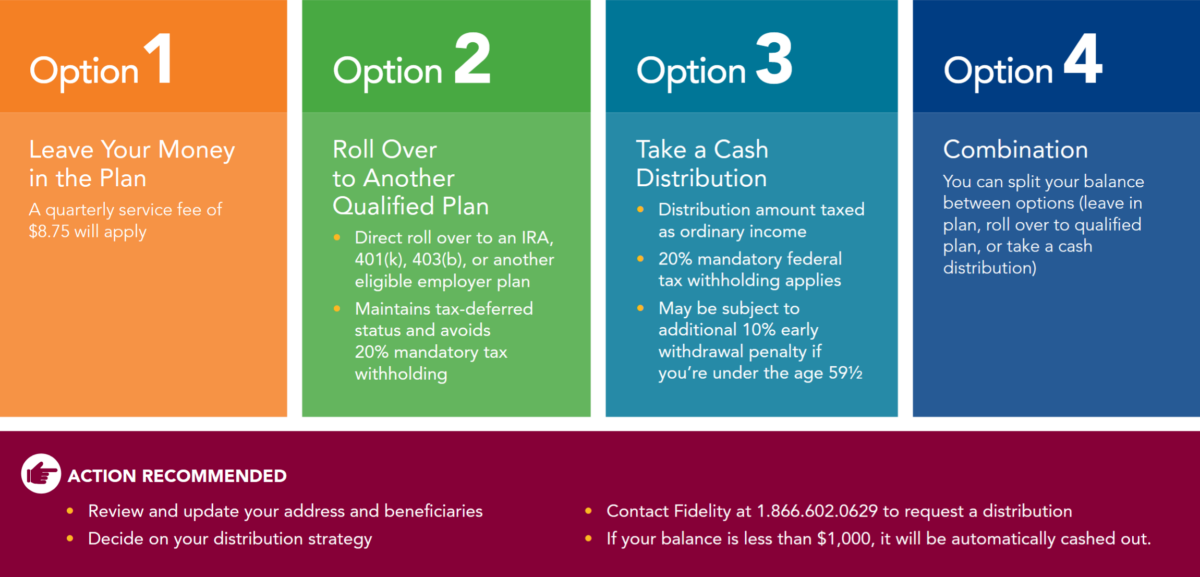
Minimum Required Distributions: Contact Fidelity by April 1 of the year prior to your 73rd birthday to initiate your minimum required distributions.
Any medical, dental, life, and vision coverage elected as an active employee will be transferred to an equivalent retiree plan once your termination has been entered into myHR Connection. If you’re Medicare eligible, you will automatically be enrolled in the Medicare secondary medical option (Indemnity Rx).
Important to Know
Making Coverage Changes
Make any changes to your medical, dental, or vision coverage within 30 days of your retirement date. Shortly after retirement, you’ll receive a letter with instructions on viewing your benefit elections and making changes online.
Paying Your Premiums
Contact the Oncor Benefits Center at 1.833.253.4927 to set up automatic payments or arrange to mail a monthly check. Note: You will not receive monthly invoices, but you will receive mid-month payment reminders.
Updating Your Beneficiary
Be sure to enter your designations and approve your beneficiary for retiree life insurance.
Call the Oncor Benefits Service Center at 1.833.253.4927 if you have questions about your coverage, payments, or beneficiary designations.
Retiree Medical Premiums
What you pay for retiree medical coverage is based on your hire date, years of service, and retirement age.
You’ll pay 100% of the cost for retiree medical coverage if you were:
Oncor Subsidy Eligibility
If none of the above apply, Oncor will contribute a subsidy toward your cost. Your premiums are calculated using a retiree medical points formula tied to rate bands with associated premiums.
Retirees are provided with $10,000 in company-paid retiree life insurance. At retirement, your company-paid basic life insurance amount is automatically added to your optional life insurance, if applicable. You can decrease your optional employee life insurance coverage after you retire, but you cannot increase it.
Important to Know
Managing Your Coverage
You can decrease your optional life insurance after retirement, but increases are not allowed. You can make a reduction at any time of the year. Your coverage includes complimentary will preparation services through MetLife Legal Plans at no cost to you.
Note: You must have elected optional employee life coverage to continue spouse life insurance at retirement. Your spouse life insurance cannot be greater than your retiree optional life coverage (max. amount of $250,000), so keep that in mind when making changes to your retiree life coverage.
Paying Your Premiums
Optional life insurance premiums can be paid through automatic payments or monthly check. Contact the Oncor Benefits Center at 1.833.253.4927 to set up your payment method.
Updating Your Beneficiary
Be sure to enter your designations and approve your beneficiary for retiree life insurance online so proceeds are paid according to your wishes.
If you’ve been employed for at least three full months during the plan year, you may be eligible for a prorated PEP award. If so, you’ll receive any payable awards around March 31 of the plan year following your retirement.
If you or a dependent are Medicare eligible when you retire, there are a few additional steps to take.
2. Automatic Oncor Coverage
3. Submit Your Medicare Beneficiary Identification (MBI) to Oncor
4. Request Form CMS-L564
Note: If you are working past age 65 or have a covered spouse who is over 65 and not enrolled in Medicare Parts A and B, you will need to submit Form CMS-L564 to Medicare.
Check out this comprehensive guide with timeline-based checklists covering pre-retirement planning to post-retirement actions. Includes detailed information on pension and 401(k) options, Medicare enrollment, health benefits, and important deadlines.
Estimate your retiree healthcare premiums based on your years of service, retirement age, and rate band. Includes information on rate bands and premium calculations.
An overview of your health and welfare benefits, including plan year changes. Includes at-a-glance summary of coverage, health tools, contact information, and resources.
Detailed information regarding health and welfare plans, resources, legal notices, and contact information.
Oncor offers a few resources to help you protect what matters most and tools to organize important information for yourself and those you love.
Free services included when you elect supplemental life coverage
Will Preparation Services
Creating a will prevents unnecessary stress and ensures your wishes are clear when it matters most. MetLife’s Optional Life Insurance includes will preparation services through MetLife Legal Plans at no extra cost.
If you prefer to use an attorney outside the network, you’ll receive reimbursement based on a set fee schedule.
Additional Support Services
Your coverage may also include:
Get Started
Visit legalplans.com/estateplanning or call MetLife Legal Plans at 1.800.821.6400 (Monday–Friday, 8am–8pm EST)
Will Writing Services
MetLife Legal Plans: 1.800.821.6400
Funeral Discount, Planning & Grief Counseling
MetLife: 1.800.638.6420
Free Consultation:
Discounted Rates for Continued Services:
Flat-Rate Documents:
24/7 Online Access: Create state-specific legal forms instantly and browse Magellan’s legal library anytime.
Note: Employment legal matters are not included.
Contact: member.magellanhealthcare.com or 1.800.327.6608
A customizable digital tool to organize all your financial information in one secure place — including employer benefits, medical directives, insurance policies, wills, and financial plans. Plan for yourself or share with elderly parents or loved ones.
For Pension/Retirement Plan and 401(k) Thrift Plan information:
Contact Fidelity through NetBenefits.com or call 1.866.602.0629
For general benefits questions:
Contact the Oncor Benefits Center at 1.833.253.4927, Monday through Friday, 8 a.m. to 5 p.m. Central Time
You can also view detailed information in the Summary Plan Descriptions for the Oncor Retirement Plan and 401(k) Thrift Plan in Resources or contact Fidelity to request free copies.

Refer to the Summary Plan Description for the Oncor Electric Delivery Company LLC Employee Welfare Benefit Plan and other documents in the Resource Library. You may obtain a copy of the required legal notices at no cost by opening a case through myhrconnection.oncor.com. Go to HR Help and submit a case to the benefits team.
Options and programs described in this website, as well as other communication materials, are intended only to be summaries of certain provisions of Oncor’s employee benefit plan(s) (the “Plan”). Benefits communication materials from the Oncor Benefits Department update and modify certain provisions of the Plan and, as such, constitutes a summary of material modifications under the law. The programs are governed by formal plan documents, and, in the event of a discrepancy, the formal plan documents will prevail. Oncor reserves the right to amend and/or terminate any or all of its benefit programs, in whole or in part, from time to time. The employee benefits offered through the Plan are optional. Any recommendations of any of the third-party administrators or insurers, or in-network/out-of- network designations are made solely by the applicable third-party administrators and/or insurance carriers, not by Oncor or the Plan.